Category: Uncategorized

  • Secure Hard Drive Disposal

    Secure Hard Drive Disposal

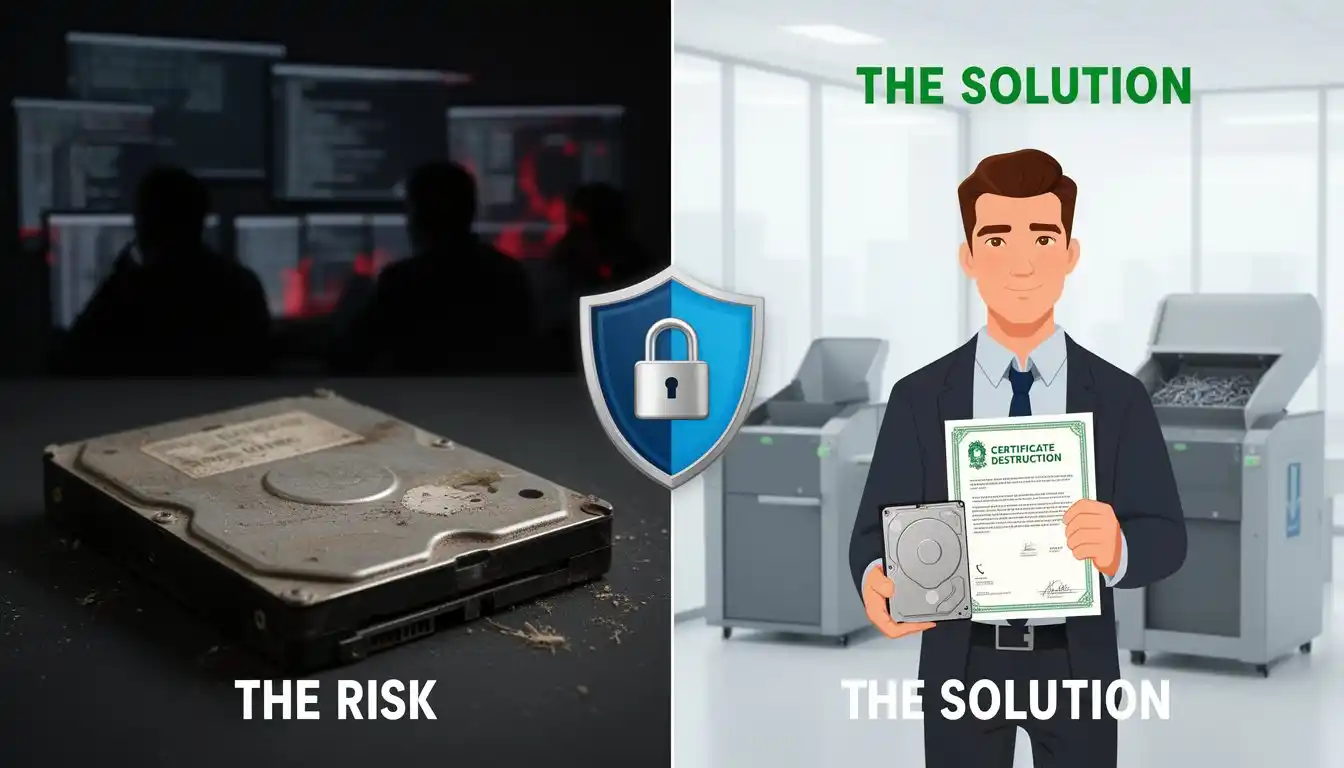
    When your business upgrades computers, servers, or storage devices, the old equipment heads to disposal. Most business owners think the hard drives are gone—wiped clean. But here’s what many SMBs don’t realize: improper hard drive disposal is a data breach waiting to happen.

    Even formatted drives contain recoverable data. Even drives labeled “wiped.” Without certified secure disposal, your confidential information—client records, financial data, employee information—can end up in the wrong hands.

    In this guide, you’ll discover why standard disposal isn’t enough, how data recovery works, and what certified secure hard drive disposal actually means. We’ll cover the legal requirements, the risks of cutting corners, and exactly how OConnell I.T. helps SMBs dispose of old equipment safely.

    Why this matters: Your business generates sensitive data every day. Protecting it doesn’t end when equipment reaches end-of-life—it continues right through disposal.

    The Hidden Risk—Data Isn’t Gone When You Think It Is

    Deleting files doesn’t destroy data. Formatting a drive doesn’t destroy data. Even a factory reset leaves recoverable information behind.

    Here’s why: When you delete a file, the operating system removes the reference to that data—not the data itself. The drive’s storage sectors remain intact, invisible to you, but accessible to anyone with data recovery tools.

    The numbers are sobering. A standard hard drive contains millions of data points. A single formatted drive can hold years of business emails, customer records, and financial documents. Data recovery software can reconstruct this information in minutes.

    Malicious buyers, data brokers, and cybercriminals specifically purchase old business hard drives at auctions and liquidation sales. They extract data, sell it, or use it for identity theft and fraud. Your business—and your clients—become victims.

    The legal risk is real, too. Regulations like HIPAA (healthcare), GDPR (if you serve European clients), and state data breach laws require “reasonable measures” to protect data. Improper disposal fails that test. A single breach can result in fines, lawsuits, and reputation damage.

    Most SMBs think “delete = gone.” It’s the biggest mistake in equipment lifecycle management.

    What Certified Secure Disposal Actually Means

    Certified secure disposal goes beyond deletion. It physically and permanently destroys data recovery options.

    Three standard methods exist:

    Degaussing: Exposing the drive to a strong magnetic field, scrambling data magnetically. Effective but not visible—you can’t verify the result.

    Shredding: Physically destroying the drive into small pieces, making data recovery impossible. Most secure option. Most verifiable.

    Certified Wiping: Using government-standard erasure software (NIST SP 800-88 compliant) that overwrites data multiple times with random patterns. Provides chain-of-custody documentation proving deletion occurred.

    Each method has trade-offs. Shredding is most secure but irreversible. Certified wiping preserves the drive’s reusability (important for refurbishing or donation).

    OConnell I.T. uses certified wiping with full documentation. Every drive receives multi-pass erasure using NIST-approved standards. You receive a Certificate of Destruction—proof your data is permanently gone—for compliance records.

    Why OConnell I.T. Handles Disposal

    Most IT companies ignore end-of-life equipment. We don’t. Protecting your data is our responsibility—from installation to disposal.

    We manage the complete lifecycle: When you upgrade, we securely erase drives, provide certificates of destruction, and arrange proper disposal. No data leaves your control unverified. No guessing. No risk.

    That’s the OConnell I.T. difference.

    Taking Action

    Your next step: Review what IT equipment you’re retiring right now. Notebooks sitting in storage? Old servers? Those drives contain your business secrets.

    Contact OConnell I.T. We’ll assess your equipment, securely erase all data, provide documentation for compliance, and ensure proper disposal. One phone call handles it.

    Ready to secure your data through end-of-life? Schedule a consultation with OConnell I.T. today.

  • Server Crash Fix 30‑Min ERP Restore | OConnell I.T.

    Client: Manufacturing Business, Bayshore, New York
    Size: 75 employees | 15 workstations | 1 primary server

    Client Profile

    The client is a mid-sized manufacturing business based in Bayshore, New York. Their operation depends on a centralized server environment supporting production systems, finance, and shipping, including a highly customized ERP platform that has evolved over more than three decades.

    The company operates on tight shipping schedules, with year-end and Christmas deadlines representing a critical business period.

    Case Study: Rapid Recovery from Critical Server Failure

    The Incident

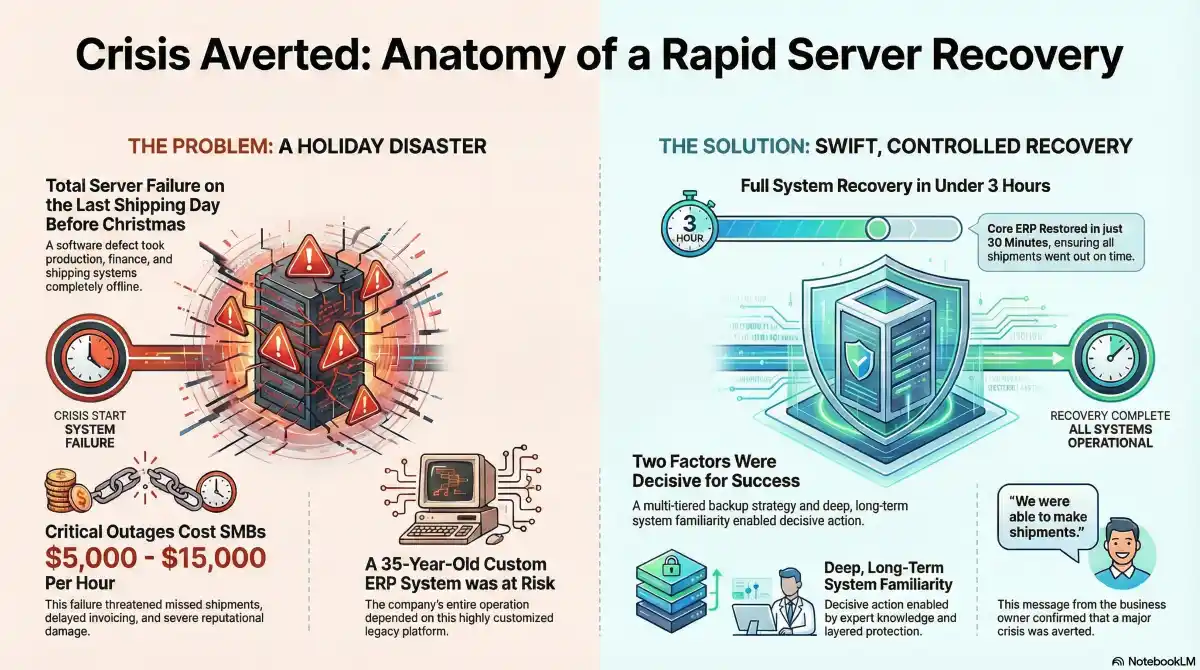
    In the early hours of a key operational day—the final shipping day before Christmas—a software defect within VMware ESXi caused the system’s data drives to present as failed, rendering all virtual machines offline.

    By the time staff arrived on site, production, finance, and shipping systems were unavailable. As a result, the outage threatened missed shipments, delayed invoicing, and failure to complete year-end reporting.

    Data Loss and Downtime Costs: Industry Context

    To frame the potential business impact:

    Downtime is expensive: For small-to-medium businesses, critical IT outages typically cost between $5,000 and $15,000 per hour when accounting for lost revenue, idle workforce, expedited recovery costs, and customer relationship damage. For a manufacturer with 75 employees during peak shipping periods, even a four-hour outage could exceed $20,000 in direct and indirect costs.

    Data loss bears broader costs: Beyond immediate financial impact, prolonged outages contribute to missed contractual deadlines, reputational damage with key accounts, and cascading effects on year-end financial reporting.

    In this context—even a short outage during a peak business window could have translated to a meaningful hit to annual performance, particularly in manufacturing where production and shipping cadence are tightly scheduled.

    Detection and Initial Response

    Our automated overnight backup system detected the incident through a failure alert. Shortly after staff arrived on site, the client contacted our office directly.

    Within minutes, remote diagnostics confirmed the scope and nature of the failure. We immediately initiated a conference call with the client’s operations manager to assess impact, align expectations, and authorize immediate remediation.

    Given the business-critical timing, we decided to bypass prolonged troubleshooting and proceed directly with a controlled system restoration.

    Recovery Execution

    We prepared a pre-staged server from our inventory immediately. We installed additional drives, configured the appropriate operating system, and transported the system to the client site.

    On arrival, we restored the client’s primary virtual machine—running a highly customized ERP system in continuous use for over 35 years—using a tiered backup architecture combining local NAS-based system imaging and redundant cloud replication.

    • Core ERP system restored within 30 minutes of arrival on site
    • Full system recovery completed in under three hours from initial report
    • Desktop systems operational within 60 minutes
    • Shipping operations resumed in time to meet UPS cut-off deadlines, preserving Christmas deliveries

    Business Outcome

    Despite a complete server outage, the company experienced minimal operational disruption. Consequently, all shipments were completed, invoicing proceeded as scheduled, and year-end obligations were met without exception.


    “Thanks again for the quick response today. We were able to make shipments.”
    — Business Owner, 7:30 PM, day of incident


    Following restoration, we briefed senior management immediately and put an agreed plan in place to address short- and medium-term infrastructure improvements.

    Why the Recovery Succeeded

    Two factors were decisive:

    Backup Architecture

    A multi-tiered backup strategy combining local system imaging with off-site cloud redundancy enabled rapid, full-system restoration without data loss.

    Long-Term System Familiarity

    Having managed the client’s IT environment since 2008, we possessed deep operational knowledge of both modern infrastructure and legacy business systems. This expertise enabled decisive action under time pressure.

    Lessons and Next Steps

    No system is immune to failure, including newly deployed hardware. However, this incident validated the importance of recovery planning over theoretical uptime.

    We anticipate the affected server will be replaced, with additional safeguards implemented to further reduce recovery time in future incidents.

    Result:

    A potentially quarter-threatening outage was reduced to a controlled, same-day recovery—at the most critical point in the client’s calendar year—preserving revenue, commitments, and operational continuity.


    Protect Your Business from Downtime

    Critical server failures don’t wait for convenient timing. Is your backup architecture tested and ready? Schedule a free infrastructure assessment to identify vulnerabilities before they become emergencies.

  • Take a Vacation As a Business Owner | OConnell I.T.

    Introduction: The Reluctance to Step Away

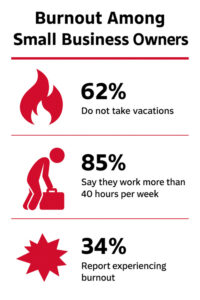
    Running a small business often feels like a seven-day sprint with no finish line in sight. For many entrepreneurs, the very idea of taking time off triggers aSmall Business Owner Stats on Burnout quiet panic—who will answer client emails, handle orders, fix the website if it crashes? It’s tempting to believe that hustle is the lifeblood of a growing enterprise.

    But here’s the inconvenient truth: refusing to take a break may actually be costing your business more than you realize. Time off isn’t an indulgence. When done right, it’s a strategic reset that strengthens leadership, improves clarity, and protects your company’s long-term sustainability.

    Let’s make the business case for something many entrepreneurs neglect—taking a proper vacation.

    1. Burnout Is Bad for Business

    Burnout doesn’t just affect your mood—it affects your judgment, your patience, and eventually, your customers. Entrepreneurs often normalize stress, mistaking it for drive. But the signs of burnout are easy to spot: short temper, mental fog, procrastination, late-night doom scrolling, disengagement from key tasks.

    More dangerously, burnout leads to reactive decision-making. You start putting out fires instead of building systems. You accept bad clients to fill gaps. You make expensive mistakes because you’re too tired to think clearly.

    According to a 2023 survey by the National Federation of Independent Business (NFIB), over 62% of small business owners reported experiencing extreme stress or burnout in the past 12 months—and that’s likely underreported. That level of chronic fatigue can degrade your performance faster than you might expect.

    Vacations aren’t the only cure, but they are a proven pressure release valve. Even a brief reset—72 hours off-grid—can improve focus, reduce cortisol, and bring back a level of emotional steadiness your business needs from its leader.

    2. Distance Drives Clarity

    One of the most underrated benefits of stepping away from your business is the mental altitude it gives you. When you’re buried in day-to-day tasks, it’s difficult to see where your business is heading. But when you unplug, your brain starts making connections it can’t make under stress.

    Ever notice how your best ideas come in the shower or while driving? That’s not a fluke. Mental downtime activates what neuroscientists call the “default mode network,” which allows your brain to wander and solve problems subconsciously.

    Vacations accelerate this process.

    Some business owners come back from vacation with a breakthrough idea, a new pricing model, or the realization that half their energy is going into low-ROI work. That kind of clarity doesn’t arrive when you’re bouncing between Slack notifications and phone calls.

    If nothing else, taking a break forces you to ask: Is my business able to run without me for a few days? If not, why?

    3. Your Team (or Your Tools) Can Step Up

    Many owners hesitate to leave because they believe the business can’t function without them. That’s a red flag, not a compliment.

    If you’ve built a company that collapses the moment you’re unreachable, it’s time to rethink your systems. Vacations act as stress tests. They expose weak points, force process improvements, and—if you have a team—create space for others to grow.

    Delegation isn’t just a management tactic; it’s a growth strategy. Trusting someone else to handle the phones, manage the schedule, or run the storefront while you’re away empowers them to take ownership. It might feel risky, but it’s the only way to scale.

    Even if you’re a solo operator, today’s tech can cover for you:

    Auto-responders handle customer emails

    Scheduling tools automate appointments

    Remote monitoring can alert you to website issues

    Managed IT or virtual assistants can cover urgent needs

    And with the right prep, you can forward critical calls without babysitting every detail

    Time off becomes easier—and safer—with good tech and better trust.

    4. Vacations Improve Long-Term Productivity

    Research consistently shows that well-rested individuals outperform their exhausted counterparts, especially when it comes to strategic thinking and creative problem-solving.

    In a landmark Harvard Business Review study, companies that encouraged managers to take breaks saw higher employee morale, fewer mistakes, and longer retention. The same applies to the owner.

    Consider this: would you rather operate at 70% capacity 365 days a year, or 95% capacity 300 days a year?

    Fatigue slowly erodes quality. Ideas that once seemed exciting start to feel like burdens. You lose the spark that made you start this journey in the first place.

    A proper vacation—defined here as at least 3 consecutive days without checking work emails—can restore focus, spark new energy, and lead to better decision-making. You return to your business not just with energy, but with a fresh perspective.

    5. Planning Time Off Is Just Good Business Hygiene

    Think of vacation planning the same way you would disaster planning, inventory audits, or tax prep—it’s part of keeping your business healthy.

    A good vacation plan isn’t about vanishing. It’s about documenting your workflows, preparing your team or tools, and communicating with clients in advance.

    Practical steps include:

    Setting up auto-responders with specific return dates

    Creating a backup point-of-contact for emergencies

    Drafting “If I’m Away” cheat sheets for employees or VAs

    Scheduling social media or blog content to publish while you’re gone

    Using project management platforms (like Trello or Asana) to track active work

    Making sure your website, backups, and customer portals are monitored by IT support

    All of this contributes to a stronger business—not just for your vacation, but permanently.

    6. Vacations Set the Tone for a Healthier Business Culture

    As the owner, you set the pace and tone of your business. If you’re always “on,” your team—if you have one—feels guilty stepping away. If you respond to emails on Sundays, clients will expect it.

    By intentionally stepping back, you model sustainability. You show that boundaries are respected and that the business is designed for long-term growth, not short-term burnout.

    Even if you’re a solo entrepreneur, setting boundaries benefits your clients. A rested, focused professional delivers higher-quality service and communicates more clearly than one constantly teetering on exhaustion.

    Want to attract better customers? Start by treating your time like it’s valuable.

    Final Word: Time Off Is Leadership, Not Laziness

    There’s a quiet pride among small business owners who never take a vacation—as if constant availability is proof of commitment. But real leadership isn’t about martyrdom. It’s about building a business that works whether you’re behind the wheel or taking a well-earned detour.

    Time away doesn’t mean losing control. It means you’ve earned the right to breathe.

    If you’re overdue for a reset, consider this your permission slip. Whether it’s a three-day staycation or a week in the mountains, your business will thank you for it.